|
| Javascript DHTML Drop Down Menu Powered by dhtml-menu-builder.com |
|
Workbook Navigator: Lets you rename, create, move, print or hide your sheets and open, close or save your workbooks.
Global Workbook Find/Replace: This feature allows you to search for information across all of your workbooks and optionally replace occurances.
Workbook History/Favorites: Shows you all of the workbooks that you have opened on your PC as well as when each workbook was accessed. You can tag workbooks as being "Favorites" and use this feature as a workbook launch pad if you find yourself opening the same group of workbooks everyday.
Index Workbooks: Generates an index of all workbooks in a given location, be it a local hard drive or a networked share. The index includes metadata about each workbook as well as a hyperlinked listing of all sheets contained within each workbook.
Revert: Revert is a function that returns your workbook to the last saved copy. Critical if you have made errors in revising a spreadsheet.
Import: Import file and folder listings into a worksheet, complete with hyperlinked file names. Analyze disk usage and find out what's eating up all of your disk space. Import data from any ODBC compliant database including Oracle, mySQL, SQL Server, Sybase and others. Grab all desired tables from a database in a single step and then analyze it using ActiveData For Excel.
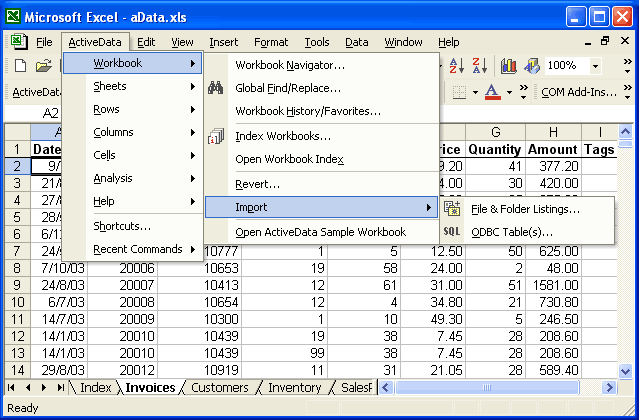
- Workbook Features
Who Use Active Data? - Worksheet Features
- Row Based Features
- Column Based Features
- Cell Based Features
- Data Analysis Features
- Other Features
Microsoft � and Microsoft Excel � are registered trademarks of Microsoft Corporation. OzGrid is in no way associated with Microsoft