 |
|
|
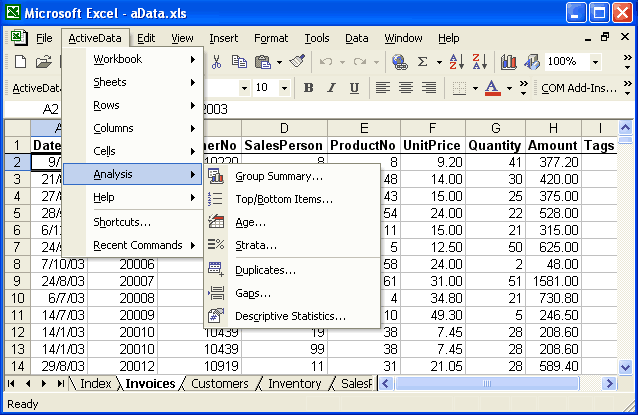
Group Summary: Summarize your data, by up to
three groups, in ascending or descending order.
Top/Bottom Items: Sort in ascending or descending order, and list
a group of the top or bottom items
Age: Take your dated information and group and total it according
to intervals you set.
Strata: Takes your data and splits it into bands that you define.
Get the totals and stats you need by the data groupings you want and
then chart if desired.
Duplicates: Find duplicates in your data and tag them. Once you
have them identified you can remove them, put them on a new sheet or
append them to an existing sheet.
Gaps: Specify a range in a column or group and then look for
items that spill over. Move them to a new sheet; append them to the
existing sheet.
Descriptive Statistics: Select a column, and get totals, averages,
standard deviations, variances, medians, mediums, max, and mins
|
Microsoft � and Microsoft Excel � are registered trademarks of Microsoft Corporation. OzGrid is in no way associated with Microsoft
FREE Excel Help