Active-Data for Excel Start
Download Active Data For Excel Demo
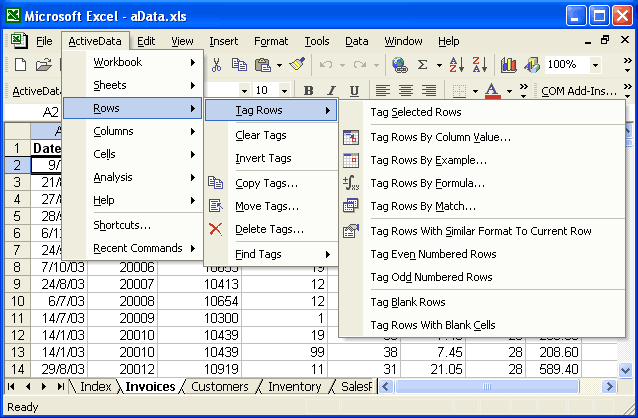
Tag Rows: Tag rows in a myriad of ways: Manually select the rows you want, Tag rows by specifying your criteria (e.g. < or > ); select columns then enter a range, specific values, case or punctuation; query by formula; match a range from one sheet against a column in the sheet you want analyzed; tag all your even and odd numbered rows; or tag gaps in your data.
Clear Tags: Clear your tagged spreadsheet in one command.
Invert Tags: Reverse tag all the rows that you have not tagged using one of the tagging mechanisms to give you a mirror image of your tags.
Copy Tags: Take your tagged rows and copy them to a new or existing sheet, or to a new or existing workbook.
Move Tags: Take your tagged rows and move them from your existing sheet to a new or existing sheet or to a new or existing workbook.
Delete Tags: Take your tagged rows and delete them in one command.
Find Tags: Click to go to your first tagged row. Find other tags in you spreadsheet in the same manner. Also find the next, previous, and last tags with one command.
 |
Active-Data for Excel Start
Download Active Data For Excel Demo