| Software Search, Categories and Specials |
Similar Products Compare Excel Compare Excel Workbooks Compare Excel Files Compare Spreadsheets For Excel Compare Suite |
|
|
Compare Spreadsheets for Excel is a powerful and convenient tool for comparison of files in Microsoft Excel.
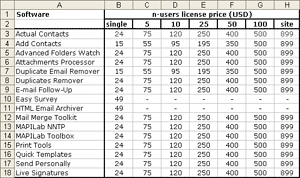
Let�s image that you get monthly price-lists from your partner:
September 2006
October 2006
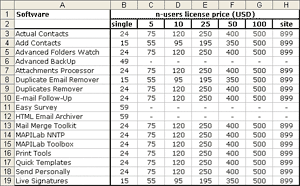
At a first glance, these price-lists look identical. It would take you a lot of time to thoroughly compare all positions in order to understand whether there are any changes or not. Save you the trouble of manually searching for differences and give this task to Compare Spreadsheets for Excel:
- Start the program (there is even no need to open the tables to be compared).
- Specify the tables or ranges of cells to be compared.
- Choose aligning parameters for comparison (by rows or columns).
- Specify what you would like to compare: cell values or formulas.
- Set the way of highlighting the different cells (background color and/or the color and style of the cell border).
Five simple actions and several seconds later � you can have the following report:
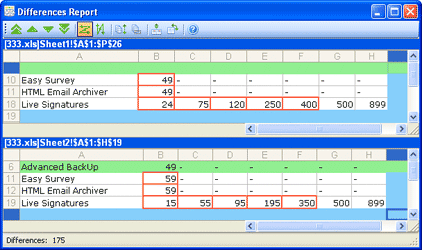
The program has successfully found all changes in the latest price list: a new product (highlighted with green) and the changed prices (cells with red border).
Now image that your files contain far more rows and columns. It is a quite difficult task to compare 2 large documents manually. Save your time and effort with Compare Spreadsheets for Excel!
In order to function properly the product requires the following:
Operating system requirements:
Software requirements:
 << Click to see price
Special! Free Choice of Complete Excel Training Course or Excel Add-ins Collection on all purchases totaling over $70.00. ALL purchases totaling over $150.00 gets you BOTH! Purchases MUST be made via this site. Send payment proof to [email protected] 31 days after purchase date.
Instant Download and Money Back Guarantee on Most Software
Excel Trader Package Technical Analysis in Excel With $139.00 of FREE software!
Microsoft � and Microsoft Excel � are registered trademarks of Microsoft Corporation. OzGrid is in no way associated with Microsoft
