 |
|
|
|
|
|
|
|
|
Please excuse grammar, text by non-English speaker.
CZ Document Converter COM is a component/object designed to assist you, the developer, to quickly add a document conversion utility to your application. It can be called from VB, VC, DELPHI. It is a batch office document converter that convert between doc, html, rtf, text, WordPerfect and Works for windows etc file format that that you can open in Microsoft Word. You can convert doc to html, html to rtf, rtf to html, doc to text, html to doc, text to html and html to text etc, you can convert a lot of files once time, saving your time! Furthermore, we provide some VB and DELPHI examples. Although you may not be using Visual Basic and DELPHI, the approach for all development environments will be similar.
CZ Document Converter COM is a component/object designed to assist you, the developer, to quickly add a document conversion utility to your application. It can be called from VB, VC, DELPHI. It is a batch office document converter that convert between doc, html, rtf, text, WordPerfect and Works for windows etc file format that that you can open in Microsoft Word. You can convert html to word, html to doc, html to rtf, text to doc, rtf to word and rtf to doc etc, you can convert a lot of files once time, saving your time!
Furthermore, we provide some VB and DELPHI examples. Although you may not be using Visual Basic and DELPHI, the approach for all development environments will be similar.
A. batch convert html to word, html to doc, html to rtf, text to doc,
rtf to word and rtf to doc files quickly.
B. support COM interface and command line arguments.
C. can add the files in subfolders to convert.
D. supports drag files and folders from your desktop.
E. fit to convert so much as over 1 million files in folder, you need not wait at
all.
1.You will need a Pentium 150 PC or higher, 16MB RAM or more.
2.The operating system should be Windows 95, Windows 98, Windows 2000, Windows NT
4.0, or Windows ME or above.
3.Of course, you must install Microsoft Word 95 or higher for windows.
What's New In CZ Document Converter COM?
Release CZ Document Converter COM V1.0 Build021120 support convert html to word, html to doc, html to rtf, text to doc, rtf to word and rtf to doc between office document (doc, rtf, html, text format and almost any other format that microsoft word will support), beautiful GUI interface, support COM interface and command line run, convert the files in subfolders.
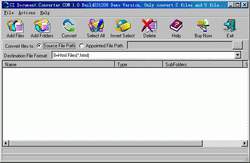
Can CZ Document Converter COM support ASP?
No, CZ Document Converter COM do not support ASP.
How does it work?
After runing cz document converter, you can simply press the "add files" button
or the "add folders" button, then select the files you want to convert to batch
conversion list with ctrl or shift key, and press the "convert" button, in a short
time you will have finished conversion!
How to use command line run?
usage: czdocvt <file path> </f:<dest file format code>> [/d:<dest
folder>] [/s] [/h]
| file path | the path and files want to be converted, this parameter must exist. for example, d:\*.doc |
| /f:<dest file format code> | destination file format code, this parameter must exist. the format code list is following: 0 word doc file 1 dot file 2 text file 3 text file with line break 4 dos text file 5 dos text file with line break 6 rtf file 7 unicode or encode text file 8 html file >8 other file format your office word can support, you can find it in CZ Document Converter COM's gui, please see following red frame. 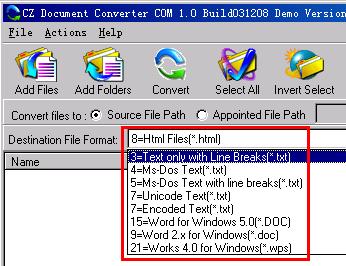 for example, /f:8, express you want convert documents to html files |
| /d:<dest folder> | destination folder for example, /d:d:\test, express file convert result will be saved to d:\test folder |
| /s | include the files in subfolders |
| /h | hide the CZ Document Converter COM gui while running |
example:
convert all word doc files in folder d:\source to html files, destination folder
is d:\dest
czdocvt d:\source\*.doc
/f:8 /d:d:\dest /s
Please notice, if your file path include space, you must add quotation marks
beside file path, like:
czdocvt "d:\My
Documents\*.doc" /f:8 "/d:e:\My Documents" /s
What's CZ Document Converter COM Properties?
Visible Property
Indicates whether the dialog of CZ Document Converter COM show. When set to
true, the dialog show, otherwise the dialog hide. You can use Visible property to
check the status of the dialog.
Syntax
boolValue = oczdocumentconvertercom.Visible


oczdocumentconvertercom.Visible = boolValue
Remarks
Boolean. The property is read/write. Returns true if the dialog show, or false
if not. Default is true.
VB Example
The following VB example sets the Visible property of a CZ Document Converter
COM object to false after initializing COM:
dim ConvertCom as object
set ConvertCom=CreateObject("czdocumentconverter.ConvertApplication")
ConvertCom.Visible=true
DELPHI Example
The following DELPHI example sets the Visible property of a CZ Document
Converter COM object to false after initializing COM:
var ConvertCom: Variant;
ConvertCom := CreateOleObject('czdocumentconverter.ConvertApplication');
ConvertCom.Visible:=true;
What's CZ Document Converter COM Methods?
ConvertFolder Method
Convert word doc files in folder to pdf files.
Syntax
strValue = oczdocumentconvertercom.ConvertFolder(SrcFilePath,DestFilePath,DestFileFormat,IsSubFolder,BSTR
Option)
Parameters
DestFilePath: String specifying destination file path, if blank then
convert to current path.
DestFileFormat: Integer specifying destination file format code, the format
code list is following:
| 0 doc file 1 dot file 2 text file 3 text file with line break 4 dos text file 5 dos text file with line break 6 rtf file 7 unicode or encode text file 8 html file >8 other file format your office word can support, you can find it in CZ Document Converter COM's gui, please see following red frame. for example, 8, express you want convert documents to html files |
IsSubFolder: Boolean. Flag that indicates whether convert
file of sub folder. If true, convert file of sub folder. If false, do not convert
file of sub folder.
Option: String, reserve.
Returns
String, return the conversion error reason, if return is blank, then
convert successfully, otherwise is error reason.
VB Example
The following VB example convert "c:\*.htm" to word doc file, not include file
of sub-folder, the conversion result is in "d:\":
dim ConvertCom as object
dim sResult as string
set ConvertCom=CreateObject("czdocumentconverter.ConvertApplication")
ConvertCom.Visible=true
sResult=ConvertCom.ConvertFolder("c:\*.htm","d:\",0,false,"")
if sResult="" then
msgbox "Convert OK!"
else
msgbox "Convert Failure, error reason
is" & sResult
end if
set ConvertCom=nothing
DELPHI Example
The following DELPHI example convert "c:\*.htm" to word doc file, not include
file of sub-folder, the conversion result is in "d:\":
var ConvertCom: Variant;
sResult:string;
ConvertCom := CreateOleObject('czdocumentconverter.ConvertApplication');
ConvertCom.Visible:=true;
sResult:=ConvertCom.ConvertFolder('c:\*.htm','d:\',0,false,'');
if sResult='' then
showmessage('Convert OK!')
else
showmessage('Convert failure, error reason
is ' + sResult);
ConvertCom:=UnAssigned;
How to use COM component/object in DELPHI?
1). COM Init
Example:
var ConvertCom: Variant;
ConvertCom := CreateOleObject('czdocumentconverter.ConvertApplication');
2). COM Property
Example:
ConvertCom.Visible:=true;
3). COM Method
Example:
sResult:=ConvertCom.ConvertFolder('c:\*.htm','d:\',0,false,'');
4). Close COM
Example:
ConvertCom:=UnAssigned;
How to use COM component/object in VB?
1). COM Init
Example:
set ConvertCom=CreateObject("czdocumentconverter.ConvertApplication")
2). COM Property
Example:
ConvertCom.Visible=true
3). Com Method
Example:
result=ConvertCom.ConvertFolder("c:\*.htm","d:\",0,false,"")
4). Close COM
Example:
set ConvertCom=nothing
Does this converter convert quickly?
Yes, CZ Document Converter COM can convert between word doc, html, rtf, text
files very quickly.
Does this converter support word xp?
Yes, CZ Document Converter COM supports word xp.
Is there a batch process available?
Yes. CZ Document Converter COM can support batch conversion between doc, html, rtf,
text files, so much as over 1500 files.
Can this converter convert many pages in a document file?
Yes. CZ Document Converter COM can convert very big document file, so much as over
5000 pages in a document file.
I am trying to use your Document Converter product (cz-docvt) to
convert HTML to RTF via the command line, but can find no way to tell it the source
document type; it seems to just copy the HTML and do no translating.
You need not to know the soure file type, and you only set the destination file
format, please add /f:6 to your command line, then you can get rtf result.
fox example: convert all htm files include sub-folder in folder d:\source to rtf
files, destination folder is d:\dest
the command line can be : czdocvt d:\source\*.htm /f:6 /d:d:\dest /s
Word Document Converter COM
 $260.00 Unconditional
30-day money-back guarantee
$260.00 Unconditional
30-day money-back guarantee
| Order Type: |
|
DEMO CONVERTERS: All Office Converter Pro | Doc Xls PPT Txt To Pdf Converter | Easy Word to Pdf Converter | Excel/Xls to Image Jpg/Jpeg Bmp Tiff Png Converter | Excel/Xls to Pdf Converter | Power Word to Pdf Converter | PowerPoint/PPT to Image Jpg/Jpeg Bmp Png Converter | PowerPoint/PPT to Pdf Converter | Quick Word to Pdf Converter | Word Excel PowerPoint to Pdf Converter | Word/Doc Excel/Xls PowerPoint/PPT To Text Converter | Word/Doc Excel/Xls to Htm Html Converter | Word/Doc Txt to Image Jpg/Jpeg Bmp Tiff Png Converter | Word/Doc to Pdf Converter & Creator Try out; Convert Mysql to Oracle | Convert Mysql to Access | Convert Oracle to Mysql | Convert MSSQL to Oracle | Convert Oracle to Access | More Converters Try out; All to Image Jpg/Jpeg Bmp Tiff Png Converter | Image TIFF Jpeg Text to Pdf Converter Try out; Htm/Html to Image Jpg/Jpeg Converter Try out; Text to Pdf Converter & Creator
See Also: Batch Document Converter & Conversion Software Index or, All Software
Instant Download and Money Back Guarantee on Most Software
Excel Trader Package Technical Analysis in Excel With $139.00 of FREE software!
Microsoft � and Microsoft Excel � are registered trademarks of Microsoft Corporation. OzGrid is in no way associated with Microsoft
Some of our more popular products are below...
Convert Excel Spreadsheets To Webpages | Trading In Excel | Construction Estimators | Finance Templates & Add-ins Bundle | Code-VBA | Smart-VBA | Print-VBA | Excel Data Manipulation & Analysis | Convert MS Office Applications To...... | Analyzer Excel | Downloader Excel
| MSSQL Migration
Toolkit |
Monte Carlo Add-in |
Excel
Costing Templates
 ALL
MS OFFICE CONVERTER
ALL
MS OFFICE CONVERTER