FREE Excel STUFF
SearchSearch Excel Content
Excel Help. Popular
NEW! Multiple Excel Search & Links
Excel Formulas
Excel Macros
Excel Newsletter
PRODUCTS
Up to $139.00 FREE!
Categories & SearchSearch for software
Excel Templates
Excel Add-ins
Excel Training
More....
OTHER
Excel Development


VBA-VB Code Builders

Add to Google Search Tips Drawing Software FREE Download!

VBA - VB Coding Tools To Create VBA - VB Code Faster, Cleaner & More Efficiently

BUY | Code VBA or Code VB6

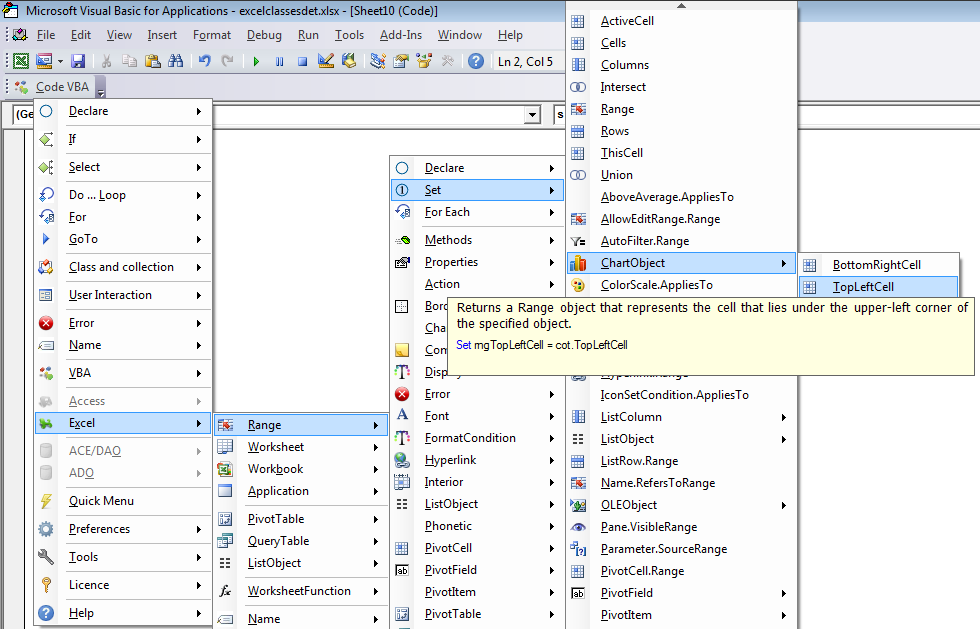
With Code VBA coding tools added to your Visual Basic editor (VBE) you create better VBA macros faster. A set of 17 specialized code builders supports the fast creation of most used code. Use with MS Access, Excel, Word and other VBA applications

With Code-VB/VBA coding tools added to your Visual Basic development environment you create better Visual Basic code faster. A set of 17 specialized code builders supports the fast creation of most used code. The integrated code fragments library lets you find programming solutions easily.

Builders included in Code-VB-VBA. Below you will find short descriptions of all builders. Links to screen shots and details near bottom

Code Line builder: insert VB and custom procedures. Tab to move thru the procedure' s arguments while selecting or adding variables.

Fragment builder: lets you use & store fragments of code which you apply many times. Typical fragments would consist of open/read/close on datasets or files, insertion of code change marks, test if  file exists, etcetera. 

Fragment editor: create new fragments. Insert markers indicating what positions and roles are available and how they are to integrate with the other builders.

Procedure builder: Add procedure with arguments including selected type of error handling, header info (author, date, description...), etcetera into selected module. 

Class builder: allows you to create both a class and a corresponding collection class in one go. For example a Task class together with a Tasks collection. The collection includes methods for adding items, class initialization and termination and an ItemExists function.

Property builder: Adding properties to classes is rather time consuming. This builder does the obvious things. It is a part of the class builder, but can also be Start ed directly from a class module to add a couple of properties.

Variable builder: declare variables without moving from the current position. The variable is added at the top of the procedure, in the procedure's interface or in a selected module. A copy can be pasted at the current position, the place where you actually use it.

Insert Variable: lists all variables in scope. Special support is built-in for the Office apps Access and Excel. Access: if  coding in form module variables representing the controls are included. Excel: Named ranges and typical object references such as ThisWorkbook and ActiveCell.

Argument builder: is Start ed from the procedure builder to speed up defining  the procedure's arguments.

Constant Builder: define constants without moving from the current position. The constant is added in the module you selected, a copy at the current position. A good practice is to have a module where you keep your constants. Using constant builder you don't have to switch modules.

Explicit argument: When you are working on existing code (refactoring?) and you want to make things more clear, this lets you make the argument explicit without having to type the full argument name. (If you insert a new procedure call and want explicit arguments the best way is to use Line of Code Builder.)
 
Enum builder: using enumerated constants is considered a professional coding practice. It is a practical way to sum up the different cases that need to be considered, typically in a Select Case or For Loop constructions. The builder encourages using this technique. Use 'Add Constant to Enum' item in the Code-VB menu to add new constants.

Fast Declare: In most cases when declaring variables, properties or constants you only care about the name and type. E.g. if you select Alt CVS (Code-VB ► Variable ► String) an Input box pops up in which you type the variable name. The result is the same as when you would have selected the variable builder, with all default options.

Code VB-VBA Builders: Code Line builder > Fragment builder > Fragment editorProcedure builder > Class builder > Property builder > Variable builder > Insert Variable > Argument builder > Constant Builder > Explicit argument > Enum builder > Fast Declare

Code VBA   $99.00 Download Demo. Payment Problems/Options

Purchase MUST be made via this site for Special

Code VB6   $99.00 Download Demo. Payment Problems/Options

Special! Free Choice of Complete Excel Training Course OR Excel Add-ins Collection on all purchases totaling over $70.00. ALL purchases totaling over $150.00 gets you BOTH! Purchases MUST be made via this site. Send payment proof to special@ozgrid.com 31 days after purchase date.

See Also: Smart VBA & Code Printing Software Or, All Software


Instant Download and Money Back Guarantee on Most Software

Excel Trader Package Technical Analysis in Excel With $139.00 of FREE software!

Add to Google Search Tips FREE Excel Help

Microsoft ® and Microsoft Excel ® are registered trademarks of Microsoft Corporation. OzGrid is in no way associated with Microsoft