 |
|
|
|
|
|
|
|
|
Mortgage and loan software includes the powerful Amortization Schedules Plus! feature that allows you to override, skip or add any number of payments. The Loan Management feature allows you to track actual loan terms and varying interest rates, as well as your actual payments made and projected payments. The Loan Manager also allows you to assess late fees and charges and track insurance, taxes, etc. Includes 14 different Day Count Conventions including 30/360 and Actual/Actual, plus many different Payment Types including Normal, Continually Adjusting Payments, Fixed Principal plus Interest and Interest Only. Also includes dozens of powerful calculators as well as many reports including annual summaries. Data file backup, integrated calculator.
- Daily, weekly, bi-weekly, semi-monthly, monthly, quarterly, semi-annual and annual payment and interest compounding frequencies. Plus Canadian Amortization and U.S. Rule (Simple Interest).
- 14 different Day Count Conventions including 30/360 and Actual/Actual.
- Specify Start date for your schedule or generate generic, non-date specific schedules.
- Change any payment amount to see the impact on the interest.
- Add any number of extra payments by clicking on the row and then the + sign.
- Skip any payment by entering 0 in the payment field.
- Specify an annual, monthly or weekly lump sum payment and a Starting year for it.
- Change the interest rate, amortization period, payment frequency or compounding frequency and instantly see the schedule recalculated.
- Generate schedules for different payment types including fixed principal plus interest, interest only and more.
- Undo and Redo buttons allow you to step through your calculation changes.
- Before and After display shows the impact of your last change.
- Specify amortization periods in Days, Weeks, Months or Years.
- Specify titles and descriptions for later retrieval.
- Click the Reports button and select the level of detail you want and what years you want to print.
Quick Feature Summary
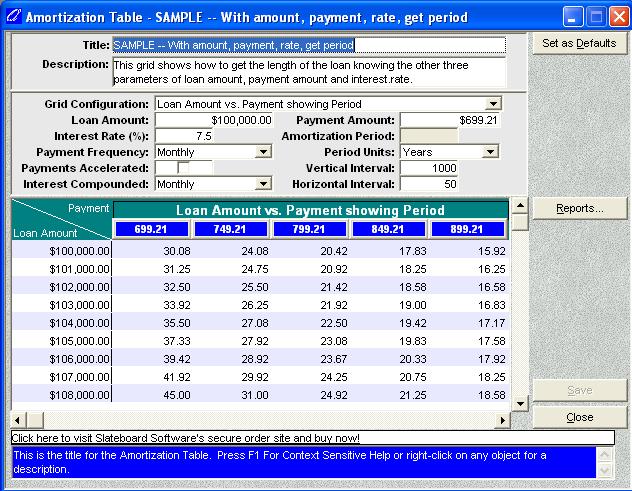
- Six different grid configurations allow you to solve for almost any missing parameter including Payment Amount and Amortization Period.
- Daily, weekly, bi-weekly, semi-monthly, monthly, quarterly, semi-annual and annual payment and interest compounding frequencies.
- Change the interest rate, amortization period, loan amount, payment frequency or compounding frequency and instantly see the table recalculated.
- Specify amortization periods in days, weeks, months or years.
- Interest amounts up to 999.9999%.
- Change the vertical and horizontal intervals to whatever increment you want.
- Click the Reports button for printable tables.
- Specify titles and descriptions for later retrieval.
 |
QuikCalc Amortization Plus! Edition
 $69.95
 Secure Payment Options 60 Day Money Back Guarantee
Special ! Free Choice of Complete Excel Training Course OR OzGrid Add-ins Collection on all purchases totaling over $70.00. ALL purchases totaling over $150.00 gets you BOTH! Purchases MUST be made via this site. Send payment proof to [email protected] 31 days after purchase date.
See Also: Excel Templates Index || QuikCalc Mortgage & Loan Manager Personal || Quick Calculation Amortization
Instant Download and Money Back Guarantee on Most Software
Excel Trader Package Technical Analysis in Excel With $139.00 of FREE software!
Microsoft � and Microsoft Excel � are registered trademarks of Microsoft Corporation. OzGrid is in no way associated with Microsoft
GIVE YOURSELF OR YOUR COMPANY 24/7 MICROSOFT EXCEL SUPPORT & QUESTIONS