 |
|
|
Current Special! Complete Excel
Excel
Training Course
for Excel 97 - Excel 2003, only $145.00.
$59.95 Instant
Buy/Download,
30 Day Money Back Guarantee & Free
Excel Help for LIFE!
Got any Excel Questions? Free Excel Help . More Excel Macros here
CREATING WORKSHEETS FOR EACH ITEM IN A TABLE
I'm often asked how one could create x number of Worksheets where each one houses the data specific to each item in a table. Let's say we have data set out like shown below.
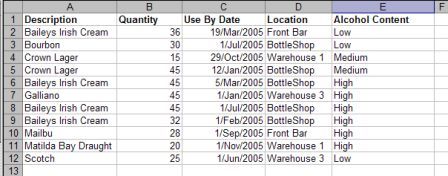
The screen shot is simply that of properly laid out table of data (A1:E12) where the first column is headed "Description". Underneath the "Description" header there are items, some of which exist more than once.
The task at hand is to create 1 Worksheet for each item (named as the item) and have all associated data on it.
You can download a working example of the code below here
Sub PagesByDescription()

Dim rRange As Range, rCell As Range

Dim wSheet As Worksheet

Dim wSheetStart As Worksheet

Dim strText As String


    Set wSheetStart = ActiveSheet

    wSheetStart.AutoFilterMode = False

    'Set a range variable to the correct item column

    Set rRange = Range("A1", Range("A65536").End(xlUp))


        'Delete any sheet called "UniqueList"

        'Turn off run time errors & delete alert

        On Error Resume Next

        Application.DisplayAlerts = False

        Worksheets("UniqueList").Delete


        'Add a sheet called "UniqueList"

        Worksheets.Add().Name = "UniqueList"


           'Filter the Set range so only a unique list is created

            With Worksheets("UniqueList")

                rRange.AdvancedFilter xlFilterCopy, , _

                 Worksheets("UniqueList").Range("A1"), True


                 'Set a range variable to the unique list, less the heading.

                 Set rRange = .Range("A2", .Range("A65536").End(xlUp))

            End With


            On Error Resume Next

            With wSheetStart

            	For Each rCell In rRange

                  strText = rCell

                 .Range("A1").AutoFilter 1, strText

                    Worksheets(strText).Delete

                    'Add a sheet named as content of rCell

                    Worksheets.Add().Name = strText

                    'Copy the visible filtered range _

                    (default of Copy Method) and leave hidden rows

                    .UsedRange.Copy Destination:=ActiveSheet.Range("A1")

                    ActiveSheet.Cells.Columns.AutoFit

                Next rCell

            End With


        With wSheetStart

        	.AutoFilterMode = False

            .Activate

        End With


        On Error GoTo 0

        Application.DisplayAlerts = True

End Sub
Excel Dashboard Reports & Excel Dashboard
ChartsExcel Dashboard Reports & Excel Dashboard Charts 50% Off Become an ExcelUser Affiliate & Earn Money
Special! Free Choice of Complete Excel Training Course OR Excel Add-ins Collection on all purchases totaling over $64.00. ALL purchases totaling over $150.00 gets you BOTH! Purchases MUST be made via this site. Send payment proof to [email protected] 31 days after purchase date.
Instant Download and Money Back Guarantee on Most Software
Excel Trader Package Technical Analysis in Excel With $139.00 of FREE software!
Microsoft � and Microsoft Excel � are registered trademarks of Microsoft Corporation. OzGrid is in no way associated with Microsoft
Some of our more popular products are below...
Convert Excel Spreadsheets To Webpages | Trading In Excel | Construction Estimators | Finance Templates & Add-ins Bundle | Code-VBA | Smart-VBA | Print-VBA | Excel Data Manipulation & Analysis | Convert MS Office Applications To...... | Analyzer Excel | Downloader Excel
| MSSQL Migration
Toolkit |
Monte Carlo Add-in |
Excel
Costing Templates