 |
|
|
|
|
|
|
|
|
Timesheet: This extremely easy and simple to use Excel Timesheet will keep track of your employees hours. It allows you to specify and set unpaid breaks in 5 minute intervals on a daily basis.
It allows you to specify and set unpaid breaks in 5 minute intervals on a daily basis. If your employees work hours that span into a new day, no problem, the time calculations will accommodate this. All Start and End times span a 24 hours period in 15 minute intervals, all you do is select a Start time and End time from a drop down list (6 min increments). This makes it impossible to enter times that Excel wont recognize.
The Timesheet will show you both Grand Total Hours and Total hours in 2 formats, decimal (e.g. 15.75) and excel 24 hour time format (e.g. 15:45)
All you do is enter your employee names once, save as a Template (.xlt) (File>Save as) and you are set.
The Time Sheet incorporates a 7 day week with any day being optional. If you need another, or longer period see Excel Timesheet Advanced
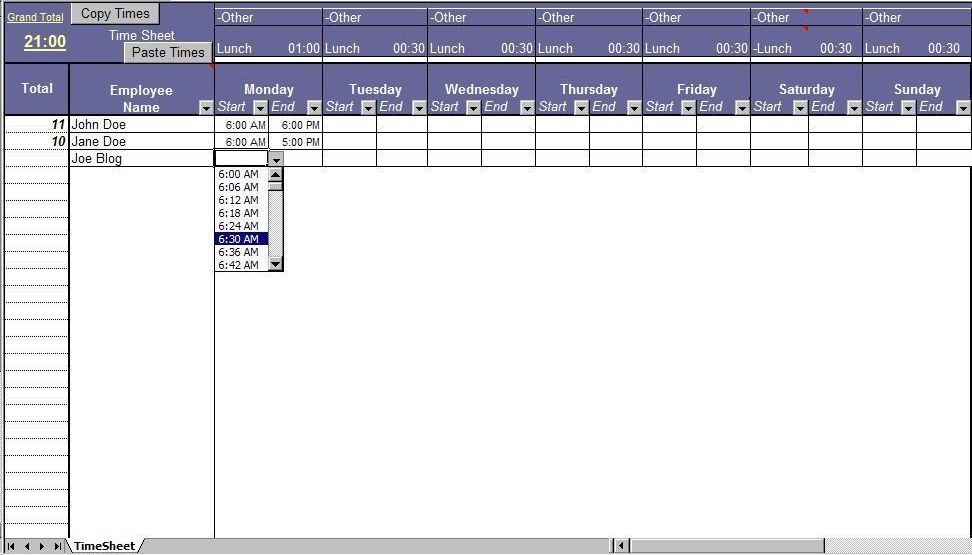
In above example, both John and Jane Start ed work at 6:00AM on Monday. Their total hours are currently at 11 and 10 respectively (note the 1 hour lunch time deducted).
Copy Times from Timesheet
This allows you to select any Employee Name and then click Copy Times, the entire weeks worth of that employees times will be copied.
Paste Times from Timesheet
After using the Copy Times (as described above) you would simply select another Employee Name and click Paste Times. This will then paste the times, for the week, to that specific employee. You can leave 'as is' or just change times that need changing.
Excel Timesheet
 $19.95. Excel 97 or above.
 Secure Payment Options 30 Day Money Back Guarantee and HUGE Discounts
for Unlimited License.
Secure Payment Options 30 Day Money Back Guarantee and HUGE Discounts
for Unlimited License.
Special ! Free Choice of Complete Excel Training Course or Excel Add-ins Collection on all purchases totaling over $70.00. ALL purchases totaling over $150.00 gets you BOTH! Purchases MUST be made via this site. Send payment proof to [email protected] 31 days after purchase date.
Instant Download and Money Back Guarantee on Most Software
Excel Trader Package Technical Analysis in Excel With $139.00 of FREE software!
Microsoft � and Microsoft Excel � are registered trademarks of Microsoft Corporation. OzGrid is in no way associated with Microsoft
GIVE YOURSELF OR YOUR COMPANY 24/7 MICROSOFT EXCEL SUPPORT & QUESTIONS