 |
|
|
|
|
|
|
|
|
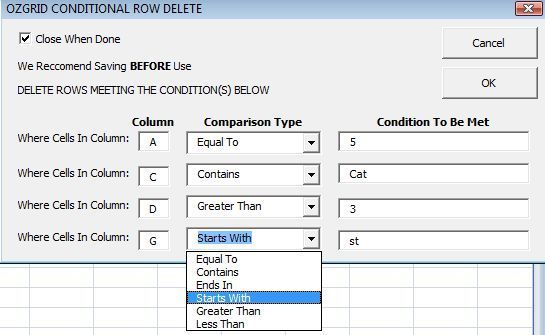
Delete rows on an Excel worksheet by conditions in an instant. Specify up to 4 conditions across 4 columns (contiguous or noncontiguous). At least 1 condition is mandatory, the remaining 3 are optional.
|
Comparison Types;
|
 |
 Instant
download & Compatible With Excel 97 or above
Instant
download & Compatible With Excel 97 or above| Order Type: |
|
 Secure Payment Options 30 Day Money Back Guarantee &
Big Discounts for Unlimited License
and Resellers License
Secure Payment Options 30 Day Money Back Guarantee &
Big Discounts for Unlimited License
and Resellers License
Single user license =2 users 2 computers| Unlimited user license = unlimited users unlimited computers | Resellers user license = Do anything you like with the add-in, including rebranding and reselling. That is, NO RESTRICTIONS AT ALL. Please email the support address and include your order number so we can send you the code password. Resellers user license ONLY
Special! Free Choice of Complete Excel Training Course OR Excel Add-ins Collection on all purchases totaling over $64.00. ALL purchases totaling over $150.00 gets you BOTH! Purchases MUST be made via this site. Send payment proof to [email protected] 31 days after purchase date.
Instant Download and Money Back Guarantee on Most Software
Excel Trader Package Technical Analysis in Excel With $139.00 of FREE software!
Microsoft � and Microsoft Excel � are registered
trademarks of Microsoft Corporation. OzGrid is in no way associated with Microsoft
GIVE YOURSELF
OR YOUR COMPANY 24/7 MICROSOFT EXCEL SUPPORT & QUESTIONS