 |
|
|
|
|
|
|
|
|
PDF to Image Details
PDF To Image Converter is an application program based on Windows platform, which can directly convert PDF files to dozens of image formats, such as TIF, JPG, GIF, PNG, BMP, EMF, PCX, TGA and so on, it does support manifold conversion way.
Function and face
- It supports dozens of image formats;
- It is convenient and easy to operate, and pdf files can be added into file list and converted fast;
- It supports Password Protected PDF file conversion;
- Specify any resolution in the generated Image files;
- Standalone software, Adobe Acrobat and Reader NOT required!
- It supports batch conversion;
- It supports produce multipage TIFF files;
- Intelligent processing of large files;
- It supports conversion into 1, 4, 8 or 24-bit format;
- It supports for PACKBITS, CCITT FAX4, LZW, JPEG compression of TIFF images;
- It can be launched from command line, from batch file or another application.
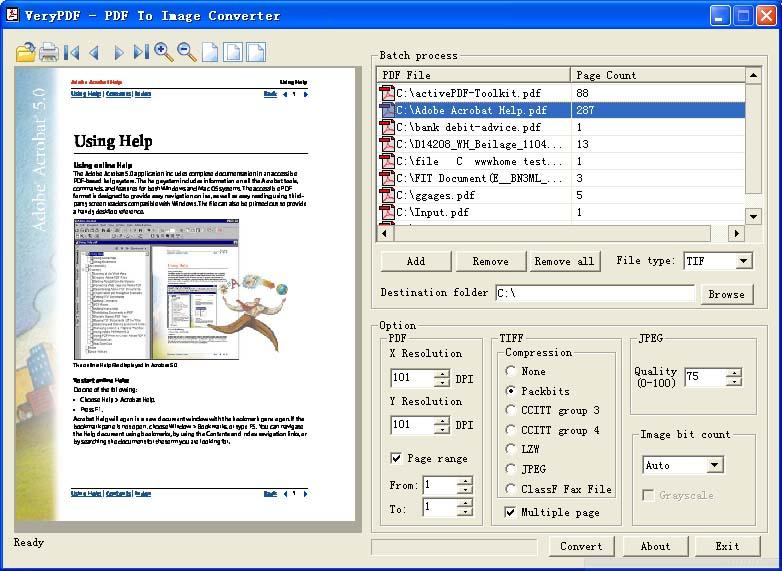
Main interface of the software:
 |
Command Line Options:
To perform batch conversion or call conversion procedure from an automation script, you can use command line function in the PDF To Image Converter software, You can either run this tool directly from command line or call it from any script as well. The program supports the following command-line options:
In the following example the program converts Adobe PDF document "c:\input.pdf" into "c:\output.tif":
Command line usage
-------------------------------------------------------
Release Date: Aug 15 2004
Usage: pdf2img [options] <-i PDF File> [-o Output]
-i [input PDF file] : Specify input PDF filename
-o [output Image] : Specify output image filename
-m
: Set output to multi-page TIFF file, the default is output to single page TIFF
files
-r [resolution] : Set resolution in generated image
files
-f [first Page] : First page to convert
-l [last Page] : Last page to convert
-c [compress] : Set compresstion method
in generated image files(for tif only)
-c lzw
: Compress TIFF using LZW arithmetic
-c jpeg
: Compress TIFF using JPEG arithmetic
-c g4
: Compress TIFF using CCITT G4 arithmetic
-q [quality] : Set quality in generated
image files(for jpg file only)
-b [bit count] : Set bit count in generated
iamge files
-?
: Help
-------------------------------------------------------
Example:
pdf2img -i C:\input.pdf -o C:\output.tif
pdf2img -m -i C:\input.pdf -o C:\output.tif
pdf2img -c lzw -i C:\input.pdf -o C:\output.tif
pdf2img -q 80 -i C:\input.pdf -o C:\output.jpg
pdf2img -b 4 -i C:\input.pdf -o C:\output.tif
pdf2img -f 1 -l 9 C:\input.pdf -o C:\output.jpg
pdf2img -i C:\*.pdf -o C:\*.pcx
Please notice, if your input pdf's filename or output tiff's filename contain space(s),
you must use quotation mark to include them, for example,
C:\>pdf2img "C:\123 456.pdf" "C:\my test\aaa.tif
"
Convert PDF to Image Converter
 $59.00
Payment Problems/Options
30 Day Money Back Guarantee
$59.00
Payment Problems/Options
30 Day Money Back Guarantee
| Pricing: |
|
Special ! Free Choice of Complete Excel Training Course OR OzGrid Add-ins Collection on all purchases totaling over $70.00. ALL purchases totaling over $150.00 gets you BOTH! Purchases MUST be made via this site. Send payment proof to [email protected] 31 days after purchase date.
Also See: PDF Export Kit by Intelligent Converters
Other PDF Software: PDF Writer | PDF To Word | PDF To Text | PDF to Txt | PDF to Text COM | PDF to Text Batch | PDF Stamp | PDF Split Merge | PDF Password Recovery | PDF Merger | PDF to Image | PDF Extract TIFF | Adobe PDF Converter | PDF Converter | Encrypt/Decrypt PDF Files | Encrypt PDF Files | Encrypt PDF Command Line | Encrypt PDF SDK Component
Instant Download and Money Back Guarantee on Most Software
Excel Trader Package Technical Analysis in Excel With $139.00 of FREE software!

Microsoft � and Microsoft Excel � are registered trademarks of Microsoft Corporation. OzGrid is in no way associated with Microsoft
Some of our more popular products are below...
Convert Excel Spreadsheets To Webpages | Trading In Excel | Construction Estimators | Finance Templates & Add-ins Bundle | Code-VBA | Smart-VBA | Print-VBA | Excel Data Manipulation & Analysis | Convert MS Office Applications To...... | Analyzer Excel | Downloader Excel
| MSSQL Migration
Toolkit |
Monte Carlo Add-in |
Excel
Costing Templates