 |
|
|
|
|
|
|
|
|
Please excuse grammar, text by non-English speaker \ Developers Site
PDF to Txt Details
About PDF to Txt Simple is a pdf converter that convert pdf to text.
This converter is an Acrobat plug-ins, so you must install Adobe Acrobat Edit Version, if you have not Adobe Acrobat Edit Version, no problem, you have another choice, you can use C PDF to Text COM for acrobat reader that no longer need the expensive Adobe Acrobat Edit Version, you only install free Adobe Acrobat Reader, saving your money.
Key Features A. convert pdf to text,
you only convert current pdf.
B. support convert current pdf and selected pages.
C. support PDF written in multi-byte Languages.
D. Preserves original document layout.
E. Convert table in pdf to delimit table text, you can appoint tab, comma, blank,
semicolon, or other char as the delimit symbol, then you can copy table text and
import it to excel or database.
System Requirements 1. You
will need a Pentium 150 PC or higher, 16MB RAM or more.
2. The operating system should be Windows 95, Windows 98, Windows 2000, Windows
NT 4.0, or Windows ME.
3. Of course, you must install Adobe Acrobat 4.0 or 5.0 ,don't support any version
of Acrobat Reader! (PDF to Txt Simple will not work with free Acrobat Reader).
Setup Guide
PDF to Txt Simple V1.1 is a plug-in for Adobe Acrobat. This pdf to text
converter is installed using the czp2ts.exe program. Setup involves the following
steps:
1. First make sure that Acrobat is not running.
2. Then, simply run the czp2ts.exe program and follow the prompts.
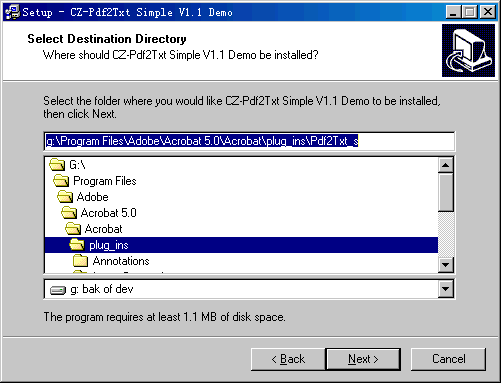
3. when select destination directory, please notice the destination directory must contains acrobat plug-ins (for example: c:\program files\adobe\acrobat 5.0\acrobat\plug_ins), otherwise program can not run properly. then click "Next" Button.
 |
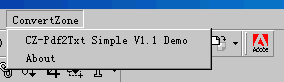
4. After the installation process, simply run Acrobat. If
PDF to Txt Simple V1.1 has been installed properly, "PDF to Txt Simple V1.1"
will appear as an option in Acrobat��s Convert Zone
menu.
 |
If you want to convert selected pages from current pdf file, you can Involve the following steps:
1).Simply run Acrobat, open the pdf file converted, going to the Convert
Zone
menu -> selecting "PDF to Txt Simple V1.1". PDF to Txt Simple displays the
following dialog box:
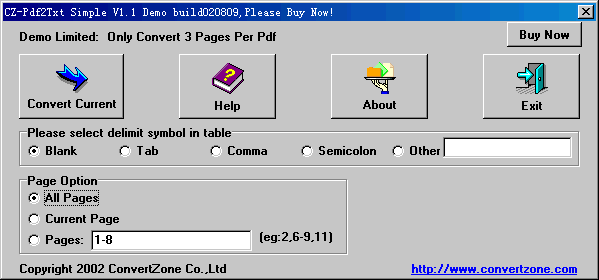 |
2).you can choose either "All Pages", "Current Page" or "Pages" to convert. then simple click "Convert Current" button.
4).After the conversion process, you can find the new generating text files in same directory
1. Why not I find the Convert Zone menu?
All of our plug-ins require full Acrobat; they will not work with the free Reader.
If you have a full version of Acrobat, please make sure the install path contains
acrobat plug-ins.
2. I have installed PDF to Txt Simple, but I am unable to get Convert
Zone menu after loading into Acrobat 5?
You should do blew step to fix your problem:
1. check whether pdf2txt_s.api is installed to acrobat 5 plug-ins path, if yes,
then go to No.2 step, otherwise, install again to right acrobat plug-ins path!
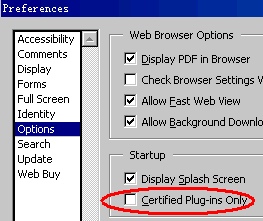
2. You should open acrobat 5, then click "Edit"->"Preferences" menu, go to "Options",
to turn off "Certified Plug-ins Only" checkbox, please see blew screenshot, then
PDF to Txt Simple can work OK.
 |
3. How to convert protected Adobe Acrobat PDF files?
You can use
PDF Password Recovery
, it can decrypt protected Adobe Acrobat PDF files, then you can use PDF to
Text to convert the decrypt pdf file to text file.
5. Does this converter convert quickly?
Yes, PDF to Txt Simple V1.1 can quickly convert pdf files to text files.
6. Does this plug-in support acrobat 6.0?
Yes, PDF to Txt Simple V1.1 can support acrobat 6.0.
7. Is there a batch process available?
No. PDF to Txt Simple V1.1 only converts current pdf. However, you can use
PDF to Text COM
PDF to Txt Converter Simple
 $150.00
Payment Problems/Options
30-day money-back guarantee
$150.00
Payment Problems/Options
30-day money-back guarantee
| Order Type: |
|
DEMO CONVERTERS: All Office Converter Pro | Doc Xls PPT Txt To Pdf Converter | Easy Word to Pdf Converter | Excel/Xls to Image Jpg/Jpeg Bmp Tiff Png Converter | Excel/Xls to Pdf Converter | Power Word to Pdf Converter | PowerPoint/PPT to Image Jpg/Jpeg Bmp Png Converter | PowerPoint/PPT to Pdf Converter | Quick Word to Pdf Converter | Word Excel PowerPoint to Pdf Converter | Word/Doc Excel/Xls PowerPoint/PPT To Text Converter | Word/Doc Excel/Xls to Htm Html Converter | Word/Doc Txt to Image Jpg/Jpeg Bmp Tiff Png Converter | Word/Doc to Pdf Converter & Creator Try out; Convert Mysql to Oracle | Convert Mysql to Access | Convert Oracle to Mysql | Convert MSSQL to Oracle | Convert Oracle to Access | More Converters Try out; All to Image Jpg/Jpeg Bmp Tiff Png Converter | Image TIFF Jpeg Text to Pdf Converter Try out; Htm/Html to Image Jpg/Jpeg Converter Try out; Text to Pdf Converter & Creator
Other PDF Software: PDF Writer | PDF To Word | PDF To Text | PDF to Txt | PDF to Text COM | PDF to Text Batch | PDF Stamp | PDF Split Merge | PDF Password Recovery | PDF Merger | PDF to Image | PDF Extract TIFF | Adobe PDF Converter | PDF Converter | Encrypt/Decrypt PDF Files | Encrypt PDF Files | Encrypt PDF Command Line | Encrypt PDF SDK Component
Instant Download and Money Back Guarantee on Most Software
Excel Trader Package Technical Analysis in Excel With $139.00 of FREE software!

Microsoft � and Microsoft Excel � are registered trademarks of Microsoft Corporation. OzGrid is in no way associated with Microsoft
Some of our more popular products are below...
Convert Excel Spreadsheets To Webpages | Trading In Excel | Construction Estimators | Finance Templates & Add-ins Bundle | Code-VBA | Smart-VBA | Print-VBA | Excel Data Manipulation & Analysis | Convert MS Office Applications To...... | Analyzer Excel | Downloader Excel
| MSSQL Migration
Toolkit |
Monte Carlo Add-in |
Excel
Costing Templates
 ALL
MS OFFICE CONVERTER
ALL
MS OFFICE CONVERTER