 |
|
|
|
|
|
|
|
|
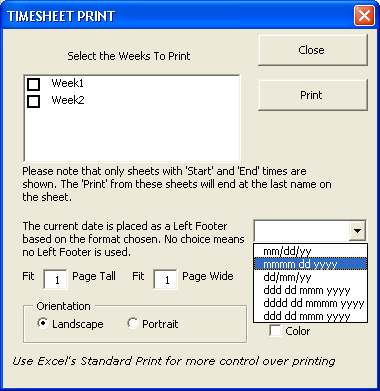
By using the Timesheet Print you will only be shown sheets that have times entered. You can then select all, or only some, of these sheets to print. The print of each sheet will only include the names (and their associated times) which have been entered by you.
You can opt to have the current date placed as a left footer of each sheet with your chosen format. If you choose no format, no left footer is used.
If the Timesheet Print is not for you, simply use Excel's standard method of printing.
Excel Time Sheet Advanced
 $29.95 Excel 97 or above.
 Secure Payment Options
30 Day Money Back Guarantee and HUGE Discounts for Unlimited License
Excel Time Sheet Advanced (Open Source)
$44.95 Excel 97 or above. Password for VBA code and Formulae supplied.
Special ! Free Choice of Complete Excel Training Course OR Excel Add-ins Collection on all purchases totaling over $70.00. ALL purchases totaling over $150.00 gets you BOTH! Purchases MUST be made via this site. Send payment proof to [email protected] 31 days after purchase date.
Instant Download and Money Back Guarantee on Most Software
Excel Trader Package Technical Analysis in Excel With $139.00 of FREE software!
Microsoft � and Microsoft Excel � are registered trademarks of Microsoft Corporation. OzGrid is in no way associated with Microsoft
GIVE YOURSELF OR YOUR COMPANY 24/7 MICROSOFT EXCEL SUPPORT & QUESTIONS